



Deploying VMware Cloud Foundation (VCF) 9 requires entering specific configuration parameters tailored to your target environment. While the VCF 9 installer allows for manual data entry, this approach can become cumbersome and error-prone. To streamline the process, the installer supports JSON configuration files, enabling an automated and repeatable deployment. If you want to avoid the pitfalls of manual JSON formatting and ensure proper syntax, the VCFJSONGenerator is an invaluable utility. In this post, we will explore the core capabilities of this tool and walk through how to use it for your deployment workflow.
Overview
The VCFJSONGenerator is an official companion tool created for VMware Cloud Foundation (VCF) 9.0. Its primary purpose is to automate the creation of complex JSON specification files required to deploy, configure, and expand VCF environments.
Instead of an administrator manually writing thousands of lines of JSON code (which is highly prone to syntax errors and configuration mistakes), this module acts as a translation engine. It reads data from the VCF Planning & Preparation (P&P) Excel Workbook—where architects design their environment—and automatically converts those spreadsheet inputs into valid, deployment-ready JSON payloads.
Core Workflow & Functionality
When an administrator is building a new VCF environment or expanding an existing one, they follow this general workflow using the module:
- Prerequisite Setup: The user runs
Set-VCFJsonGenerationPrequisites, which checks the system and automatically installs required dependencies, such as theImportExcelmodule and the necessary VMware PowerCLI modules. - Data Ingestion: The user runs
Start-VCFJsonGeneration. This launches an interactive Command Line Interface (CLI) menu. The user points the tool to their filled-out VCF P&P Excel Workbook. - Targeted Generation: The interactive menu allows the user to choose exactly which JSON file they want to generate based on their current deployment phase. For example, they can generate JSONs for:
- Initial Bring-up: Deploying a brand new VCF Management Domain.
- Workload Domains: Adding compute capacity via new VI Workload Domains.
- Edge Clusters: Configuring NSX networking and routing.
- Day-N Operations (Post-Bringup): Generating specs to deploy Aria Suite components (VCF Operations, VCF Automation, VCF Operations for Logs) after the initial infrastructure is up and running.
How it Works?
You can install the VCF JSON Generator directly from PowerShell Gallery:
Once the Module is installed you need to ensure that the your environment is configured with the pre-requisites for the VCFJSONGenerator Module, for this you should run the Set-VCFJsonGenerationPrerequisites command as shown below.
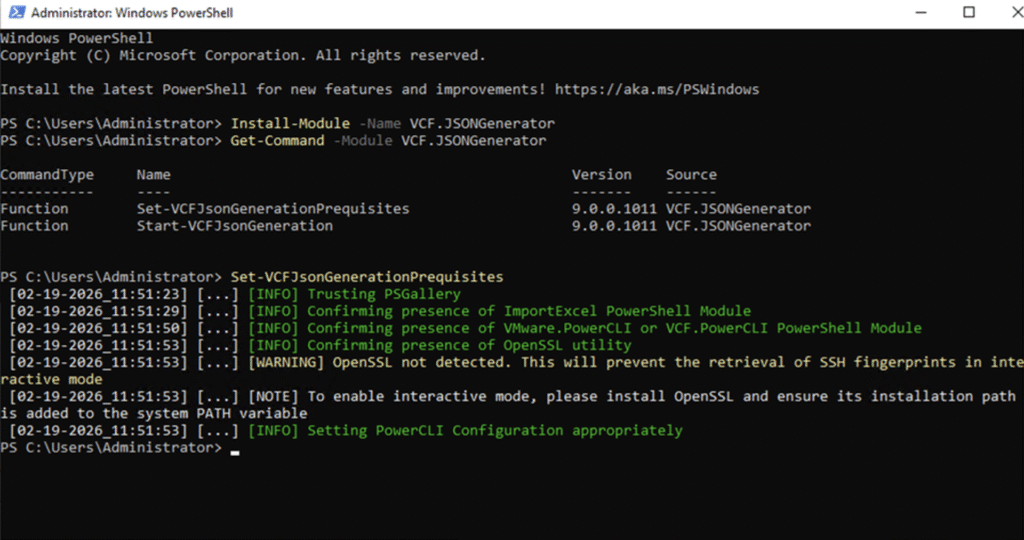
After the environment is configured successfully for the JSONGenerator Module to run you can execute the Start-VCFJsonGeneration command to actually start the JSON generation utility
First step is to choose the option 01 for planning and preparation based option for the JSON generation.
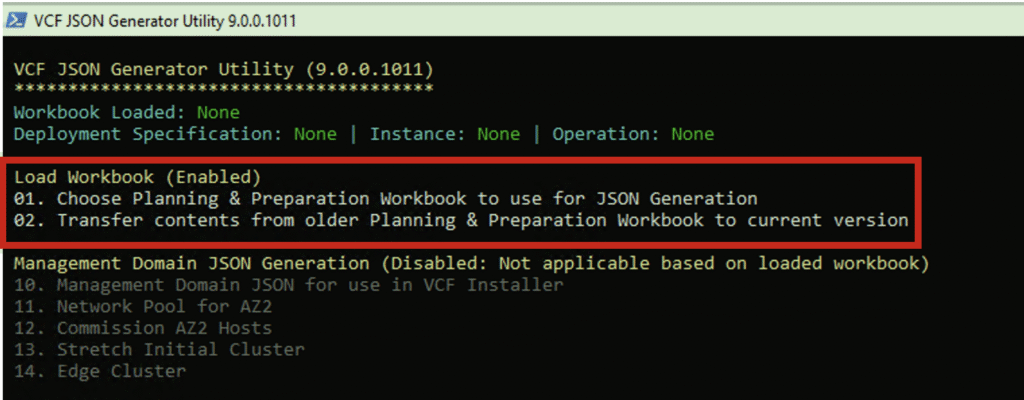
Next step is to choose an option to load the vcf-9.0-planning-and-preparation-workbook.xlsx which is option 5 as shown below.
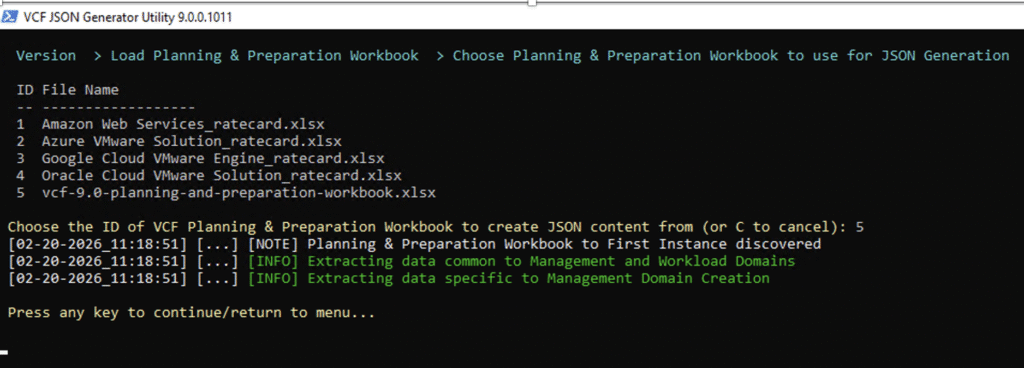
Once the planning and preparation workbook is loaded successfully, the applicable option to process further actions will be enabled and user will be prompted to enter the desired option for JSON generation.
Here you can see based on the input in my vcf-9.0-planning-and-preparation-workbook.xlsx file I can only see the Management domain JSON generation option enabled.
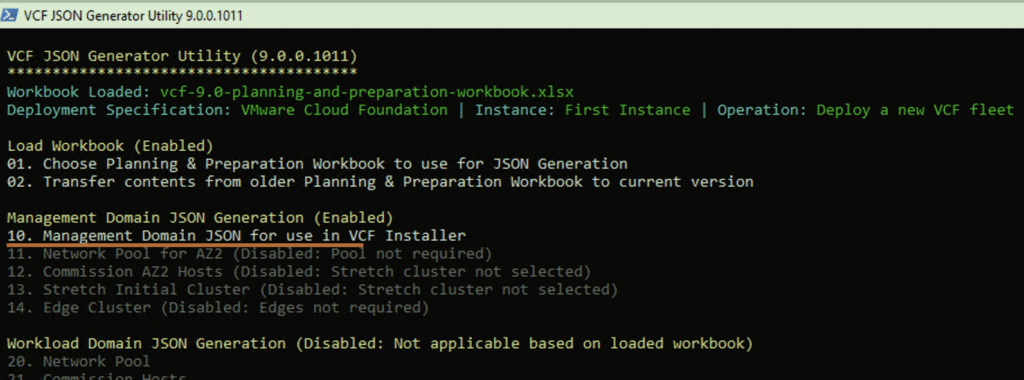
After selecting the respective option which is option 10 here, the JSON file will be generated by the utility.

There are a lot of other options available when using the JSON generator utility for various use cases of VCF 9 deployment and Day 2 actions. You can create the input file which fits your use cases by providing the required inputs and the JSON generator will detect those inputs and make the relevant options available for JSON output generation.
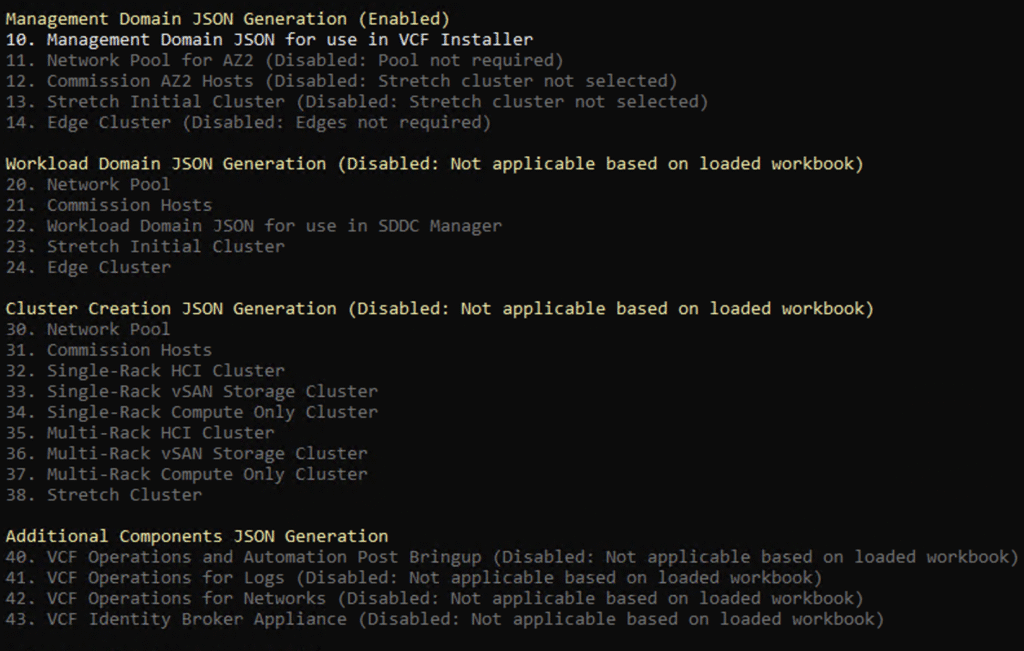
Thats about it.. Hope you benefit from this post and happy playing around with JSON generator…